Photoscape is a

Free Photo Editor (Freeware)

,

Free Photo Editing Software Download


Features:

Viewer

Editor

Batch Editor

Page

Combine, Collage

Animated GIF

Print

Splitter

Screen Capture

Color Picker

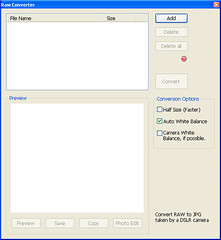
RAW to JPEG Converter

Rename


Editor Features:

Exif, Photo Frames, Speach Bubbles, Filters, Brightness, Contrast, Saturation, Sepia, Color Balance, White Balance, Gamma, Exposure, EXIF, Sharpern, Blur, Backlight correction, Red eye removal, Cropping, Resizing, Bloom & Glow, Filmlike


Photoscape enables you fix and enhance your photos taken by

digital cameras

,

DSLR cameras

and

video camcorders

from

Sony, Samsung, Cannon, Nikon, Olympus, Kodak, Pentax.


Convert RAW to JPG

Workflow

  1. Add your photos by clicking "Add" button.
  2. Change conversion options on the right. (Half Size, Auto White Balance, Camera White)
  3. Click "Convert" button to convert RAW to JPG.

Comment

  • The converted jpg files are saved in the same folder containing original RAW files.

Preview

  • Click "Preview" button to show your selected RAW file in preview window.
  • Click "Save" button to save the preview photo.
  • Click "Copy" button to copy the preview photo to clipboard.
  • Click "Photo Edit" button to open the preview photo at photo editor tab.
hit counters